📝 产品详情
Kalifx TradePad
| 作者 | Calvin Andile Mahlangu |
| 版本 | v1.10 |
| 更新 | 10 四月 2026 |
| 激活数 | 10 |
| 原价 | $35 USD |
KALIFX TRADEPAD – MT5 TRADING PANEL
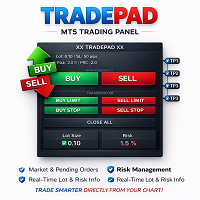
Kalifx TradePad is a smart and user-friendly trading panel for MetaTrader 5 designed to simplify trade execution, risk management, and order control directly from the chart. Instead of manually calculating lot sizes, stop losses, or take profits, TradePad allows traders to visually prepare trades using adjustable lines before sending the order.
The panel provides instant access to market orders, pending orders, position management tools, and real-time risk calculations. This makes TradePad ideal for both beginner and professional traders who want faster execution and precise risk control.
Market Order TradingTradePad allows traders to prepare market orders visually before execution.
How it works:
• Click the BUY or SELL button once
• Trade lines will appear on the chart (Entry, Stop Loss, and Take Profit levels)
• Adjust these lines directly on the chart to match your trading plan
• Click the BUY or SELL button again to confirm and send the trade
This method allows traders to precisely control their entry, stop loss, and take profit levels before opening a position.
Pending Order TradingTradePad also supports all major pending order types for advanced trading strategies.
Supported order types:
• Buy Limit
• Buy Stop
• Sell Limit
• Sell Stop
When any pending order button is clicked:
• Pending order lines will appear on the chart
• You can adjust the entry, stop loss, and take profit levels visually
• Click the same pending order button again to confirm and place the order
TradePad includes powerful management buttons for controlling trades instantly.
• Close All – Closes all active positions for the current symbol
• Close Buy – Closes all active BUY trades
• Close Sell – Closes all active SELL trades
• Del Pending – Deletes all untriggered pending orders
• Set B/E – Moves stop loss of active trades to breakeven
• Clear Lines / Reset – Removes all trading lines and resets the panel
At the top of the TradePad panel you will see live information labels that calculate and display important trading metrics before opening a position.
Displayed information includes:
• Calculated Lot Size
• Trade Risk in Account Currency
• Risk Percentage
• Stop Loss Distance
These values update automatically as you move the stop loss or entry lines, helping traders maintain proper risk management before executing a trade.
Input ParametersLot Sizing Settings
• Lot Mode – Select how the lot size will be calculated
• Fixed Lot – Uses a constant lot size for every trade
• Risk Percent – Calculates lot size based on percentage risk of account balance
• Risk Money – Calculates lot size based on a fixed money risk per trade
Stop Loss & Take Profit Settings
• Default SL – Default stop loss distance in points
• TP1 Points – Distance to the first take profit level
• TP2 Points – Distance to the second take profit level
• TP3 Points – Distance to the third take profit level
• TP1 Close % – Percentage of position closed at TP1
• TP2 Close % – Percentage closed at TP2
• TP3 Close % – Final percentage closed at TP3
Trailing Stop Settings
• Enable Trailing Stop – Activates automatic trailing stop functionality
• Trailing Start – Profit distance required before trailing begins
• Trailing Stop – Distance between current price and trailing stop
• Trailing Step – Minimum movement required before updating the stop loss
Breakeven Settings
• Enable Breakeven – Activates automatic breakeven protection
• Breakeven Trigger – Profit distance required before moving SL to breakeven
• Breakeven Offset – Additional points added above entry when breakeven activates
Pending Order Settings
• Pending Offset – Default distance from current price to pending entry
• Pending SL – Stop loss distance for pending orders
• Pending TP – Take profit distance for pending orders
• Pending Expiry – Expiration time for pending orders (0 = Good Till Cancelled)
Panel Settings
• Panel X / Y Position – Adjust panel location on the chart
• Font Size – Controls panel text size
• Panel Colors – Customize panel appearance and button colors
Advanced Settings
• Magic Number – Unique identifier used by the EA for trade management
• Max Slippage – Maximum allowed price slippage when sending orders
• Order Comment – Custom comment attached to trades
It is recommended to test the EA Utility on a demo account first to fully understand the panel features and optimize settings for your trading strategy.
安全须知
本产品仅通过 MQL5.com 官方渠道获取。其他渠道版本可能缺少完整功能和技术支持。
EA 配置
| 交易品种 | XAUUSD |
| 时间框架 | H1 (推荐) |
| 推荐经纪商 | IC Markets, IC Trading |
| 最低存款 | $300 / 0.01手 |
📸 截图预览