📝 产品详情
Market Profile Suite
| 作者 | Muhammad Minhas Qamar |
| 版本 | v8 |
| 激活数 | 10 |
| 原价 | $59 USD |
Developed by MMQ — Market Profile Suite
Was: $79 Now: $59
A comprehensive Market Profile indicator for MetaTrader 5 that visualizes price distribution through TPO (Time Price Opportunity) analysis. The implementation draws from concepts presented in Jim Dalton's "Mind Over Markets," providing traders with tools to understand market structure, value areas, and volume distribution across multiple timeframes and session configurations.
Links [ Documentation | Video | More ]
Feature Highlights
- Four profile modes: Period-based, Session-based, Anchor Start, and Fixed Range
- TPO visualization with customizable letters, fonts, and color schemes
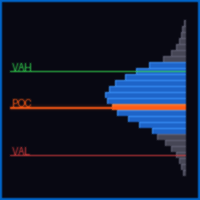
- Automatic POC (Point of Control) and Value Area calculation
- Initial Balance highlighting with multiple calculation methods
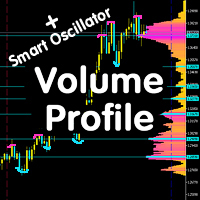
- Volume Profile with buy/sell split analysis and flexible positioning
- Single print detection and visualization
- Interactive drawing mode for custom profile ranges
- Statistics panel showing profile comparisons and key metrics
- Comprehensive hotkey system for efficient workflow
- Split view mode for analyzing TPO distribution patterns
- Session-based coloring for intraday analysis (up to 8 sessions)
- Optimized rendering for low timeframes (M1-M4)
Input Parameters
| Parameter | Type | Default | Description |
|---|---|---|---|
Profile Mode Settings | |||
| Profile Mode | Enum | Period-Based | Determines how profiles are calculated: Period-Based (Weekly, Daily, etc.), Session-Based (custom time sessions), Anchor Start (continuous from date), or Fixed Range (specific date range) |
| Profile Period | Enum | Daily | Period for profile calculation in Period-Based mode. Options: Monthly, Weekly, Daily, 4H, 1H, 30M, 15M, 5M |
| Anchor Start Date | DateTime | 0 | Starting date for Anchor Start and Fixed Range modes |
| Anchor End Date | DateTime | 0 | Ending date for Fixed Range mode only |
| Session Settings | |||
| Session 1-8 | String | Various | Time ranges in HH:MM-HH:MM format for Session-Based mode. Up to 8 sessions can be defined per day |
| Lookback Days | Integer | 5 | Number of trading days to analyze in Session-Based mode. Set to 0 to use Number of Profiles parameter |
General Settings | |||
| Start Offset | Integer | 0 | Offset from current period. 0 starts from the current period, 1 skips current period, etc. |
| Number of Profiles | Integer | 7 | Maximum number of profiles to display on chart (max 100) |
| Points per TPO | Integer | 16 | Price range (in points) represented by each TPO row. Lower values create finer granularity |
| Hide Candles | Boolean | True | Makes chart candles transparent to show only the profile |
Hotkeys | |||
| Split View Hotkey | String | S | Toggle split view mode showing TPO distribution by time period |
| Hide TPO Hotkey | String | H | Toggle TPO profile visibility while keeping volume profile and statistics |
| Hotkey Panel Hotkey | String | K | Show/hide the hotkey reference panel |
| Stats Panel Hotkey | String | I | Cycle statistics panel position: Top → Bottom → Off |
| Profile Mode Hotkey | String | M | Cycle through profile modes: Period → Session → Anchor → Fixed Range |
| Draw Mode Hotkey | String | D | Enable interactive drawing mode to create custom profile ranges |
| Delete Last Hotkey | String | X | Delete the most recently drawn custom profile |
| Volume Hotkey | String | V | Cycle volume profile display: Off → Total → Buy/Sell Split |
| Volume Position Hotkey | String | P | Cycle volume profile position: Left → Right → Inside |
TPO Appearance | |||
| Font Size | Integer | 7 | Size of TPO letters in points |
| Font Name | String | Monospace | Font family for TPO letters. Monospace fonts recommended for alignment |
| Letter Spacing | Integer | 8 | Horizontal spacing between TPO letters in pixels |
| Split View | Boolean | False | Initial state of split view mode |
| TPO Color | Color | White | Color of TPO letters |
TPO Box Settings | |||
| Show TPO Boxes | Boolean | True | Display colored boxes behind TPO letters |
| Box Color Scheme | Enum | Sequential | Color scheme for TPO boxes: Sequential (smooth gradient), Balanced (varied hues), Alternating (maximum contrast), Single Color, or Session-Based |
| Box Single Color | Color | Midnight Blue | Color used when Box Color Scheme is set to Single Color |
| Box Transparency | Integer | 200 | Transparency level of TPO boxes (0=transparent, 255=solid) |
| Box Gap | Integer | 1 | Padding/gap around TPO boxes in pixels (0-3) |
Session Colors | |||
| Session 1-8 Color | Color | Various | Colors assigned to each session when using Session-Based color scheme |
| Value Area Settings | |||
| VA Percentage | Double | 70.0 | Percentage of total volume/TPO count contained within Value Area (typically 70%) |
| VA Background | Color | Gold | Background color for Value Area zone |
| VA Transparency | Integer | 45 | Transparency of Value Area background (0=transparent, 255=solid) |
| POC Color | Color | Yellow | Color of Point of Control line (price level with highest volume/TPO count) |
| VAH/VAL Border Width | Integer | 2 | Width of Value Area High and Value Area Low border lines in pixels |
Profile Borders & Initial Balance | |||
| Show Profile Borders | Boolean | True | Display vertical lines marking profile start and end times |
| Border Color | Color | Silver | Color of profile border lines |
| Border & IB Width | Integer | 1 | Width of border and Initial Balance lines in pixels |
| Show Initial Balance | Boolean | True | Highlight the Initial Balance range |
| IB Calculation Mode | Enum | First Hour | Method for calculating Initial Balance: First N Bars, First Hour, First 30 Minutes, or Disabled |
| IB Period Bars | Integer | 2 | Number of bars for Initial Balance when using "First N Bars" mode |
| IB Color | Color | Blue | Color of Initial Balance highlight zone |
Single Prints | |||
| Show Single Prints | Boolean | True | Display markers for single print price levels (prices that appear only once in the profile) |
| Marker Color | Color | Salmon | Color of single print markers |
| Marker Size | Integer | 2 | Size of single print markers in pixels |
Volume Profile | |||
| Buy Volume Color | Color | Green | Color for buy volume bars in split mode |
| Sell Volume Color | Color | Crimson | Color for sell volume bars in split mode |
| Total Volume Color | Color | Dim Gray | Color for total volume bars when not in split mode |
| Volume Transparency | Integer | 50 | Transparency of volume histogram bars (0=transparent, 255=solid) |
| Max Histogram Width | Integer | 50 | Maximum width of volume histogram as percentage of profile width |
| Right Position Offset | Integer | 10 | Offset in bars when volume profile is positioned on the right (useful for developing profiles) |
Master Market Structure. Trade with Confidence — Developed by MMQ
安全须知
本产品仅通过 MQL5.com 官方渠道获取。其他渠道版本可能缺少完整功能和技术支持。
EA 配置
| 交易品种 | XAUUSD |
| 时间框架 | H1 (推荐) |
| 推荐经纪商 | IC Markets, IC Trading |
| 最低存款 | $300 / 0.01手 |
📸 截图预览