📝 产品详情
RiskManagementEA
| 作者 | Nguyen Huu Chung |
| 版本 | v1 |
| 激活数 | 5 |
| 原价 | $50 USD |
# Risk Management EA - User Manual
## ? Table of Contents
1. [Overview](#overview)
2. [Installation](#installation)
3. [Features](#features)
4. [Input Parameters](#input-parameters)
5. [User Interface](#user-interface)
6. [How to Use](#how-to-use)
7. [Advanced Features](#advanced-features)
8. [Troubleshooting](#troubleshooting)
---
## ? Overview
**Risk Management EA** is a professional trading tool designed to help traders manage risk, split orders, and automate take profit settings. It provides a user-friendly interface for placing orders with precise risk control.
### Key Benefits:
- ✅ Automatic lot size calculation based on risk percentage
- ✅ Split orders with different take profit levels
- ✅ Auto TP distribution (50% at 1R, remaining at 2R, 4R, 6R...)
- ✅ Break Even functionality
- ✅ Support for Market and Pending orders (Limit/Stop)
- ✅ Visual UI panel with drag & drop
---
## ? Installation
### Step 1: File Structure
Place the files in the correct folders:
```
MQL5/
├── Experts/
│ └── RiskManagementEA-English.ex5 ← Main EA file
│
└── Include/RiskManagementEA/
├── RiskManager-English.mqh ← Risk management class
├── TradeManager-English.mqh ← Trade management class
└── UIPanel-English.mqh ← UI interface class
```
### Step 2: Compile
1. Open **MetaEditor** (F4 from MT5)
2. Open `RiskManagementEA-English.ex5`
3. Press **F7** or click **Compile** button
4. Check for errors in the **Errors** tab
### Step 3: Attach to Chart
1. Open MT5
2. Drag `RiskManagementEA` from **Navigator** → **Expert Advisors** to your chart
3. Enable **AutoTrading** (Ctrl+E or click icon)
4. The UI panel will appear on the chart
---
## ⚡ Features
### 1. **Risk Management**
- Set maximum total risk as percentage of account balance
- Define risk per position (% or fixed USD)
- Real-time risk monitoring
- Prevents over-risking
### 2. **Split Orders**
- Split one trade into multiple orders
- **Manual Mode**: Enter different SL for each split
- **Auto Mode**: Same SL for all splits
- Auto distribute TP levels across splits
### 3. **Auto Take Profit**
- Automatically calculate TP based on Risk-Reward ratios
- **For single orders**: Uses first R ratio (e.g., 1R)
- **For split orders**:
- First half: 1R
- Second order: 2R
- Third order: 4R
- Fourth order: 6R
- And so on...
### 4. **Entry Price**
- **Entry = 0**: Place Market order immediately
- **Entry > 0**: Place Pending order (Limit/Stop)
- Buy Limit if entry < current price
- Buy Stop if entry > current price
- Sell Limit if entry > current price
- Sell Stop if entry < current price
### 5. **Break Even**
- Move SL to entry + specified pips
- Only affects orders of current symbol
- Safe confirmation dialog
### 6. **Close All**
- Close all orders of current symbol only
- Does not affect other symbols
- Safe confirmation dialog
---
## ⚙️ Input Parameters
### Risk Management
| Parameter | Type | Default | Description |
|-----------|------|---------|-------------|
| `InpMaxRiskPercent` | double | 10.0 | Total maximum risk allowed (%) |
### Risk Per Position
| Parameter | Type | Default | Description |
|-----------|------|---------|-------------|
| `InpRiskTypeInput` | int | 0 | 0 = Percent, 1 = Fixed USD |
| `InpRiskValue` | double | 1.0 | Risk value per trade |
**Example:**
- Type = 0, Value = 1.0 → Risk 1% per trade
- Type = 1, Value = 50 → Risk $50 per trade
### Split Orders
| Parameter | Type | Default | Description |
|-----------|------|---------|-------------|
| `InpUseSplitOrder` | bool | false | Enable/disable split orders |
| `InpSplitModeInput` | int | 1 | 0 = Manual, 1 = Auto |
| `InpNumSplits` | int | 4 | Number of splits (2-10) |
### Take Profit
| Parameter | Type | Default | Description |
|-----------|------|---------|-------------|
| `InpAutoTP` | bool | true | Auto calculate TP |
| `InpTPRatios` | string | "1,2,4,6,8" | R multiples for TP levels |
**How TP Ratios work:**
- `"1,2,4"` = TP at 1R, 2R, 4R
- For split orders, first half gets 1R, then 2R, 4R...
### Break Even
| Parameter | Type | Default | Description |
|-----------|------|---------|-------------|
| `InpBEPips` | double | 5.0 | Additional pips when moving to BE |
---
## ?️ User Interface
### Panel Layout
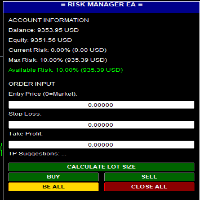
```
┌─────────────────────────────┐
│ ≡ RISK MANAGER EA ≡ │ ← Header (drag to move)
├─────────────────────────────┤
│ ACCOUNT INFORMATION │
│ Balance: $10,000.00 │
│ Equity: $10,150.00 │
│ Current Risk: 2.5% ($250) │
│ Max Risk: 10.0% ($1000) │
│ Available Risk: 7.5% ($750) │
├─────────────────────────────┤
│ ORDER INPUT │
│ Entry Price (0=Market): │
│ [0.00000] │
│ Stop Loss: │
│ [1.08000] │
│ Take Profit: │
│ [1.09000] │
│ Suggestions: 1R=1.09, 2R=... │
├─────────────────────────────┤
│ [ CALCULATE LOT SIZE ] │
│ [ BUY ] [ SELL ] │
│ [ BE ALL ] [ CLOSE ALL ] │
├─────────────────────────────┤
│ Status: Ready... │
└─────────────────────────────┘
```
### Color Codes
- **Green buttons**: Action buttons (Buy/Sell/Calculate)
- **Gold button**: Break Even (BE ALL)
- **Red button**: Close All orders
- **Green text**: Available risk (positive)
- **Red text**: No available risk (at limit)
---
## ? How to Use
### Basic Trading Workflow
#### 1. **Market Order (No Entry)**
```
1. Leave Entry Price = 0
2. Enter Stop Loss (e.g., 1.08000)
3. (Optional) Enter Take Profit or leave 0 for auto TP
4. Click BUY or SELL
```
**Result:**
- Order opens immediately at market price
- If Auto TP enabled: TP calculated automatically
- Lot size calculated based on risk settings
#### 2. **Pending Order (With Entry)**
```
1. Enter Entry Price (e.g., 1.08500)
2. Enter Stop Loss (e.g., 1.08000)
3. (Optional) Enter Take Profit
4. Click BUY or SELL
```
**Result:**
- Pending order placed at Entry price
- Type determined automatically (Limit/Stop)
- Activates when price reaches entry
#### 3. **Split Orders**
```
1. Enable: InpUseSplitOrder = true
2. Set: InpNumSplits = 4
3. Set: InpAutoTP = true
4. Enter Entry (or 0 for market)
5. Enter Stop Loss
6. Click BUY or SELL
```
**Result:**
- 4 orders placed with same SL
- TP distributed automatically:
- Order 1-2: TP = 1R
- Order 3: TP = 2R
- Order 4: TP = 4R
#### 4. **Calculate Lot Size**
```
1. Enter Stop Loss
2. Click "CALCULATE LOT SIZE"
```
**Result:**
- Shows calculated lot size
- Shows SL in points
- Shows current price
#### 5. **Break Even**
```
1. Wait for trade to be in profit
2. Click "BE ALL" button
3. Confirm in dialog box
```
**Result:**
- All orders of current symbol move to BE + 5 pips
- Orders of other symbols unaffected
- Safe from reversal
#### 6. **Close All**
```
1. Click "CLOSE ALL" button
2. Confirm in dialog box
```
**Result:**
- All orders of current symbol closed
- Orders of other symbols remain open
- P&L realized
---
## ? Advanced Features
### 1. **Custom TP Ratios**
Change `InpTPRatios` to customize TP levels:
```
"1,1.5,3" → TP at 1R, 1.5R, 3R
"2,4,6,8" → TP at 2R, 4R, 6R, 8R
```
### 2. **Manual Split Mode**
Set `InpSplitModeInput = 0` for manual control:
- Enter different SL for each split
- System calculates proportional lot sizes
- More flexible for complex strategies
### 3. **Fixed Risk in USD**
Set `InpRiskTypeInput = 1` and `InpRiskValue = 100`:
- Every trade risks exactly $100
- Independent of account balance
- Good for consistent risk management
### 4. **Multiple Symbols**
Run EA on multiple charts simultaneously:
- Each chart manages its own symbol
- Break Even affects only current chart symbol
- Close All affects only current chart symbol
- Total risk tracked across all symbols
### 5. **Drag & Drop UI**
Click and drag the **header** (blue bar) to move panel anywhere on chart.
---
## ? Troubleshooting
### Problem: EA doesn't open orders
**Check:**
1. AutoTrading enabled (Ctrl+E)
2. Stop Loss entered correctly
3. Available risk > 0
4. Account has sufficient margin
5. Symbol is tradable
### Problem: "Maximum risk limit reached"
**Solution:**
- Close some existing positions
- Or increase `InpMaxRiskPercent`
- Or reduce `InpRiskValue`
### Problem: Split orders not working
**Check:**
1. `InpUseSplitOrder = true`
2. `InpNumSplits` between 2-10
3. `InpAutoTP = true` (for auto TP)
4. Check Experts log for errors
### Problem: Auto TP not filling
**Check:**
1. `InpAutoTP = true`
2. `InpTPRatios` has valid values
3. Leave TP input = 0 (or blank)
4. Split orders enabled for distribution
### Problem: Break Even doesn't work
**Possible causes:**
- Orders already at or past BE
- No orders for current symbol
- SL already better than BE level
### Problem: Lot size too small/large
**Adjust:**
- Reduce/increase `InpRiskValue`
- Check SL distance (larger SL = smaller lot)
- Verify account balance
---
## ? Example Scenarios
### Scenario 1: Conservative Trader
```
InpMaxRiskPercent = 5.0
InpRiskTypeInput = 0
InpRiskValue = 0.5
InpUseSplitOrder = false
InpAutoTP = true
InpTPRatios = "2"
```
**Result:** Risk 0.5% per trade, TP at 2R (1:2 R:R)
### Scenario 2: Aggressive Scalper
```
InpMaxRiskPercent = 15.0
InpRiskTypeInput = 0
InpRiskValue = 2.0
InpUseSplitOrder = false
InpAutoTP = true
InpTPRatios = "1"
```
**Result:** Risk 2% per trade, quick 1R targets
### Scenario 3: Professional with Scaling
```
InpMaxRiskPercent = 10.0
InpRiskTypeInput = 0
InpRiskValue = 1.0
InpUseSplitOrder = true
InpNumSplits = 4
InpAutoTP = true
InpTPRatios = "1,2,4,6"
```
**Result:**
- 1% total risk split into 4 orders
- 2 orders close at 1R (secure profit)
- 1 order at 2R
- 1 order at 4R (let winners run)
---
## ? Support
For questions or issues:
- Check EA logs: Tools → Options → Expert Advisors → Enable logs
---
## ⚠️ Disclaimer
Trading forex and CFDs carries high risk. This EA is a tool to assist with risk management but does not guarantee profits. Use at your own risk. Always test on demo account first.
---
## ? Version History
**v1.00** (2025)
- Initial release
- Risk management system
- Split orders with auto TP
- Entry price support (Market/Limit/Stop)
- Break Even functionality
- Close All (symbol-specific)
- Draggable UI panel
---
*Last updated: January 2025*
安全须知
本产品仅通过 MQL5.com 官方渠道获取。其他渠道版本可能缺少完整功能和技术支持。
EA 配置
| 交易品种 | XAUUSD |
| 时间框架 | H1 (推荐) |
| 推荐经纪商 | IC Markets, IC Trading |
| 最低存款 | $300 / 0.01手 |
📸 截图预览