📝 产品详情
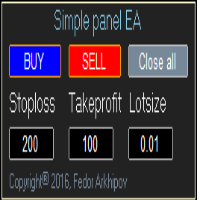
Simple panel EA
| 作者 | Fedor Arkhipov |
| 版本 | v1.8 |
| 更新 | 2016-10-28T12:11:02 |
| 激活数 | 4 |
This is a simple panel EA for one-click trading.
Unlike the standard panel, it features the Close all button for closing all orders on the current symbol, as well as the ability to enter the stop loss and take profit values before opening an order.
The EA distinguishes its orders from others, therefore, the magic number must be specified in the panel settings.
The panel is able to take screenshots when opening and closing deals to allow further analysis of the signals for opening/closing orders.
The “Info” button displays the statistics of your trading.
Attention! Stop loss and take profit are set in pips.
Do not forget to enable auto trading.
Panel Settings
- ECN account
- Use pending menu to open/close pending orders
- Slippage - maximum slippage, pips
- Show stoploss on chart (value and % of balance)
- Show takeprofit on chart (value and % of balance)
- Magic number - unique number to let the EA distinguish its own orders from the ones opened manually or by other EAs. If MagicNumber=0 then the EA closes all orders on the current symbol
- Use make screen shorts – take screenshots when opening/closing orders
- Show history info – display trading statistics all the time
- X coordinate – position of the panel along the X axis
- Y coordinate – position of the panel along the Y axis
- TextColor - color of the Stoploss, Takeprofit, Lotsize labels on the panel
安全须知
本产品仅通过 MQL5.com 官方渠道获取。其他渠道版本可能缺少完整功能和技术支持。
EA 配置
| 交易品种 | XAUUSD |
| 时间框架 | H1 (推荐) |
| 推荐经纪商 | IC Markets, IC Trading |
| 最低存款 | $300 / 0.01手 |
📸 截图预览