📝 产品详情
Trend Strength Heatmap Multi Pair and Timeframe
| 作者 | Norma Binti Abdul Razak |
| 版本 | v4.0 |
| 更新 | 1 四月 2026 |
| 激活数 | 0 |
Trend Strength Heatmap (Real-Time)
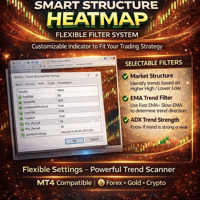
Smart Structure Heatmap is a multi-timeframe trend analysis indicator designed to help traders quickly identify market direction and overall trend strength based on real time.
The indicator combines several technical filters into a simple heatmap dashboard, allowing traders to view trend conditions across multiple timeframes in one place.
Trend direction is displayed using color signals:
? Green ? Uptrend (buy)
? Red ? Downtrend (sell)
? Yellow ? Sideways
STR% Trend Strength
The indicator calculates an STR% value to represent the strength of the current trend (real time) based on multiple filters and timeframe alignment.
Example interpretation:
? 25% – Weak trend
? 50% – Moderate trend
? 75% – Strong trend
? 100% – Very strong trend
Filters Used
Smart Structure Heatmap combines several technical methods:
1. Market Structure (Higher High / Lower Low)
2. EMA Trend Filter
3. ADX Trend Strength
4. RSI Momentum Filter
5. Heikin Ashi Trend Confirmation
? All filters can be enabled or disabled depending on the trading strategy.
? Key parameters such as EMA, ADX, RSI, and other filters can be adjusted to suit different market conditions and trading styles.
Trading Platform
Compatible with MetaTrader 4 (MT4)
Indicator Usage in MQL Market
If you purchase an indicator (like this Heatmap), the system in the MQL Market works as follows.
Account Usage
Once a buyer purchases the indicator, it can be used on:
✔ Demo accounts
✔ Live accounts
There is no restriction to demo only. The indicator works on both demo and live trading accounts.
Activation Limit
Each purchase usually comes with 5 activations. Example of activation usage:
- MT4 on home computer
- MT4 on laptop
- MT4 on VPS
- Reinstalling MT4
- MT4 on another computer
Every time the indicator is installed on a new MT4 terminal, it will use one activation.
How Many Accounts Can Use It?
Indicators are not limited by trading accounts. They are linked to the MT4 terminal installation instead. In a single MT4 terminal, the indicator can be used on:
• Multiple charts
• Multiple symbols
• Both demo and live accounts
Example :
The same MT4 terminal can use the indicator on multiple pairs such as:
• EURUSD
• GBPUSD
• XAUUSD
• BTCUSD
There is no limitation on the number of charts or symbols.
If you have other questions, feel free to message me. Thank you!.
安全须知
本产品仅通过 MQL5.com 官方渠道获取。其他渠道版本可能缺少完整功能和技术支持。
EA 配置
| 交易品种 | XAUUSD |
| 时间框架 | H1 (推荐) |
| 推荐经纪商 | IC Markets, IC Trading |
| 最低存款 | $300 / 0.01手 |
📸 截图预览