📝 产品详情
Trade BTN 4
| 作者 | Prafull Manohar Nikam |
| 版本 | v1.0 |
| 激活数 | 8 |
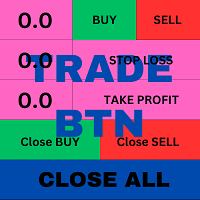
This is an ON CHART trade management panel. In other words, ON CHART Lot Size, Buy, Sell, Stop Loss, Take Profit, Close Buy, Close Sell and Close All buttons!
*IMPORTANT NOTE: Input settings are NOT usable. You can change or insert Stop Loss and Take Profit values only on the chart panel. (See the below video!)
This one is MT4 version!
BUTTONS List:
1. Lot Size - (0.01) is default click on it and insert the lot size with which you want to open a trade.
2. Stop Loss - (0.0) is default click on it and insert the stop loss size in pips.
3. Take Profit - (0.0) is default click on it and insert the take profit size in pips.
4. Buy - Click to open open a buy trade (market price quick trade!) with inserted Lot, SL and TP values.
5. Sell - Click to open a sell trade (market price quick trade!) with inserted Lot, SL and TP values.
6. Close Buy - Click on this button to quickly close all the BUY open orders only.
7. Close Sell - Click on this button to quickly close all the SELL open orders only.
8. Close All - Click on this button to quickly close all the BUY/SELL open orders.
REMEMBER: This is just an utility to help you in your manual trading not an expert advisor which is a full automatic trading system.
安全须知
本产品仅通过 MQL5.com 官方渠道获取。其他渠道版本可能缺少完整功能和技术支持。
EA 配置
| 交易品种 | XAUUSD |
| 时间框架 | H1 (推荐) |
| 推荐经纪商 | IC Markets, IC Trading |
| 最低存款 | $300 / 0.01手 |
📸 截图预览