📝 产品详情
Ultimate Dashboard Demo
| 作者 | Siwakon Poonsawat |
| 版本 | v2.4 |
| 更新 | 2016-09-13T16:46:46 |
| 激活数 | 63550 |
Tools designed for multi-currency trading.
- You can customize which currency you want to trade, analyze up to 10 currencies by yourself.
Analysis method.
(Refer to screenshot 1)
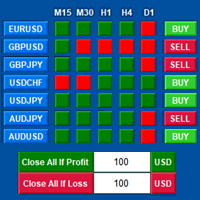
- Ultimate dashboard analyzes trend strength from six major time frames: M5, M15, M30, H1, H4, D1
- Show the result in graphic format. You can identify which currencies have the best strength, trend.
One click trading panel.
(Refer to screenshot 1)
- Ultimate dashboard is designed for easy trading in one click.
- You can open order immediately by simply clicking buy, sell button on the chart.
- You can manage stop loss, take profit, close all positions at profit, loss target.
Close all positions at profit, loss target function
(Refer to screenshot 2)
This function useful to manage risk of trading, you can set profit, loss target by amount of money ( can work on every trading account currencies - $, € ).
Example 1. Setting close all when Profit = 100$
- That means that when all your opening positions have total profit => 100$, all open positions will be closed immediately.
Example 2. Setting close all when Loss = 100$
- That means that when all your opening positions have total loss => 100$, all open positions will be closed immediately.
Input parameter
(Refer to screenshot 3)
1. Symbol 1 - 10
- Custom symbols, currencies that you want to trade
- Can be setup to 10 currencies at the same time.
2. Default Lot Size
- Setup default lot size of EA panel.
3. Default Take Profit
- Setup default take profit level of EA panel.
- If you want open orders without take profit you can enter "0"
4. Default Stop Loss
- Setup default stop loss level of EA panel.
- If you want open orders without stop loss you can enter "0"
5. Close if Profit Loss Function
- Enable/Disable Close if Profit / Loss Function
6. Default Close if Profit
- All opening orders will automatically close when profit reached by amount of your money setting.
7. Default Close if Loss
- All opening orders will automatically close when loss reached by amount of your money setting.
8. Alert Function
- EA will automatic show alert message when close if profit / loss have reached
9. Background Color
- Custom background color of EA panel.
安全须知
本产品仅通过 MQL5.com 官方渠道获取。其他渠道版本可能缺少完整功能和技术支持。
EA 配置
| 交易品种 | XAUUSD |
| 时间框架 | H1 (推荐) |
| 推荐经纪商 | IC Markets, IC Trading |
| 最低存款 | $300 / 0.01手 |
📸 截图预览