📝 产品详情
SG InfoBox
| 作者 | Hleb Smoliar |
| 版本 | v25.66 |
| 更新 | 6 三月 2025 |
| 激活数 | 5 |
The "InfoBox" utility is designed to display the presence of open orders, the number of lots, current profit and much more in one window.
The version for the MT5 platform is here.
You've probably encountered a situation where you have an advisor that works on a currency pair, but information about its operation:
- orders and their number, the size of the spread for the instrument, the volume of lots on the market, drawdown and much more - are scattered in different places of the terminal and you do not have information on the market “here and now”!
So, this utility shows the trader:
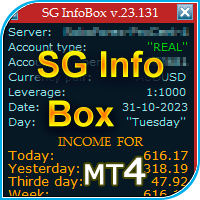
- Trading server, account type: Real/Demo/Contest, account number, currency pair, leverage, date, day of the week;
- Income for: - month, - week, - day before yesterday, - yesterday, - today;
- Balance, funds, broker margin, drawdown as a percentage of the amount of Equity or Free Margin, risk, losses;
- Number of buy/sell orders on the market, size of lots on the market, current profit on buy/sell;
- Spread size.
It is important to note that the utility displays information on the instrument (currency pair) on the chart of which it is installed. If there are currently no open orders for an instrument, all columns except Balance will show zero (0).
Starting from version 23.129, a trader has the opportunity to “bind” the utility to each advisor separately. To do this, you need to enter the magic number of the desired advisor in the appropriate window of the utility, after which the utility will “pick up” the transactions of this advisor. That is, information about different advisors placed on the same instrument on different charts will not be summarized as it was before.
In addition, the trader will have the opportunity to choose which amount is included in the calculation of the drawdown - Equity or Free Margin.
The window with the Risk percentage for the Transaction responds to a computer mouse click. Thus, a trader can change the risk numbers and see the size of Losses directly from the chart screen, without opening the “Input Parameters” of the utility. If necessary, the trader can collapse/expand the utility or remove it from the chart with one click.
I was glad to share this utility with you. I hope you find this useful for trading and can share your observations in the comments and ratings of this product.
P.S.
If, after opening the Meta Trader 4 program, the “SG InfoBox” utility previously installed on the chart freezes - switch timeframes.
安全须知
本产品仅通过 MQL5.com 官方渠道获取。其他渠道版本可能缺少完整功能和技术支持。
EA 配置
| 交易品种 | XAUUSD |
| 时间框架 | H1 (推荐) |
| 推荐经纪商 | IC Markets, IC Trading |
| 最低存款 | $300 / 0.01手 |
📸 截图预览