📝 产品详情
TradeKeeper Lite
| 作者 | Evgeniy Scherbina |
| 版本 | v2.15 |
| 更新 | 2019-01-02T07:05:52 |
| 激活数 | 63550 |
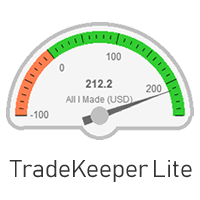
The utility TradeKeeper Lite can show your profits for different periods and bip a sound when you reach a profit target value. Click the tachometer to quickly switch to the next profit period. There are 5 of them: This Day, This Week, This Month, Last 90 Days and All I Made.
Click the minus/plus button in the corner to collapse or expand all data.
The profit calculation takes into account swaps and commissions.
You should use your entire trading history for a correct profit calculation: go to the tab "Terminal >> Account History", click the
right mouse button and set "All History".
Properties of the TradeKeeper Lite:
Color preset - you can choose among 2 for now.
Fontsize - helps fit the text to your screen resolution.
Corner - choose where to place your data: Left upper chart corner, Left lower chart corner, Right lower chart corner or Right
upper chart corner.
Magic - your magic number to keep account of. It is handy if you have several strategies and you want to see the stats for only one of
them.
Profit period - how your tachometer calculates profits by default: This Day, This Week, This Month, Last 90 Days or All I Made.
Profit max - it is used for creating your tachometer. It should be positive.
Profit min - it is used for creating your tachometer. It should be negative.
Profit target - you indicate this in your deposit currency. The TradeKeeper Lite calculates the current
profit value as a difference of Equity and Balance. When the target you set is reached, the TradeKeeper Lite notifies you
with a sound.
安全须知
本产品仅通过 MQL5.com 官方渠道获取。其他渠道版本可能缺少完整功能和技术支持。
EA 配置
| 交易品种 | XAUUSD |
| 时间框架 | H1 (推荐) |
| 推荐经纪商 | IC Markets, IC Trading |
| 最低存款 | $300 / 0.01手 |
📸 截图预览