📝 产品详情
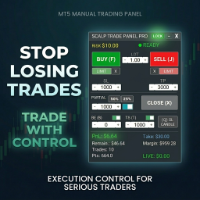
Trade Manager oneclick control
| 作者 | Pankaj Kushwaha |
| 版本 | v1.5 |
| 更新 | 2025-11-11T19:00:05 |
| 激活数 | 0 |
? Key Features
Place instant BUY/SELL orders with one click.
The EA automatically sets the Stop Loss to the last closed candle’s low (for BUY) or high (for SELL) based on the current timeframe.
⚠️ Safety Rule: A BUY will not be placed if price is currently below the last candle’s low, and a SELL will not be placed if price is above the last candle’s high.
✅ Close All Losing Trades (Global)
Close all currently losing positions, even if they belong to different symbols and not only the chart running the EA.
A fast way to reduce drawdown and manage risk across the entire account.
✅ Close All Profit Trades (Global)
Close all profitable trades across all symbols with a single click.
Closes all open positions across all symbols, not just the one where the EA is attached. Perfect for emergency exits or quick risk management.
The “Close All Running Trades”, “Close All Profit”, “Close All Losing” button works globally — it will close trades from all symbols.
Risk managers who prefer quick breakeven protection
Timeframes: Any
- Trade Manager oneclick control is a manual trade management EA — it does not open or close trades automatically based on strategy logic.
- Only “Close All Running Trades”, “Close All Profit”, “Close All Losing” works across all symbols; other functions apply only to the attached symbol.
- Always test on a demo account before live use.
- No profit guarantee: Trading involves risk. Past performance does not guarantee future results. The developer is not liable for any financial losses while using this tool.
- Ensure you are aware of and comply with your local trading and regulatory guidelines.
- The developer is not responsible for any financial losses, misuse, or regulatory violations related to this tool.
❓ Frequently Asked Questions (FAQ)
1️⃣ What happens if multiple trades are open on the same symbol and I click on Rev ×1 (Reverse)?
All running trades for that symbol will be closed, and the EA will open the same number of reverse trades at the current market price.
? Example: If you have 3 active BUY trades, all will close and 3 new SELL trades will be opened instantly.
2️⃣ What happens if multiple trades are open on the same symbol and I click on Close 50%?
The EA will close 50% of the total lot size for all open trades on that symbol, effectively performing a partial close across all active positions.
3️⃣ What happens if multiple trades are open on the same symbol and I click on Make BE (Breakeven)?
If a trade is in profit, its Stop Loss will be adjusted to the entry price, making it risk-free.
Trades that are currently in loss will be skipped and remain unchanged.
4️⃣ Does this EA open trades automatically?
❌ No. TradeManager does not place automatic orders or open trades based on any strategy.
It only manages existing manual trades or trades placed by another EA.
5️⃣ Does the Close All Running Trades button affect all symbols?
✅ Yes. This function closes all open trades across all symbols, regardless of which chart the EA is attached to.
Other buttons (Rev ×1/×2, Close %, Make BE) apply only to the attached symbol.
6️⃣ Can I use this EA with other Expert Advisors?
Yes. TradeManager works alongside other EAs — it only manages trades and does not interfere with automated logic.
安全须知
本产品仅通过 MQL5.com 官方渠道获取。其他渠道版本可能缺少完整功能和技术支持。
EA 配置
| 交易品种 | XAUUSD |
| 时间框架 | H1 (推荐) |
| 推荐经纪商 | IC Markets, IC Trading |
| 最低存款 | $300 / 0.01手 |
📸 截图预览