📝 产品详情
TradeShield Auto Stoploss and Breakeven
| 作者 | Thi Cam Nhung Nguyen |
| 版本 | v1.0 |
| 激活数 | 10 |
| 原价 | $70 USD |
?️ Auto SL · Break-Even · Session TP Manager
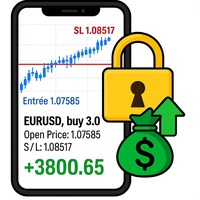
Automatically sets Stop Loss, moves SL to Break-Even when profit is reached, and calculates Take Profit by R:R ratio based on trading session. You will never forget to set SL again.
⚙️ Core Functions
| ? Stop Loss | Automatically applies a fixed SL to every new manual trade and pending order. Once set — never miss protection again. |
| ⚡ Break-Even | When price moves a set number of pips in profit, SL moves to entry + offset. Once triggered — locked permanently. Trade becomes risk-free. |
| ? Session TP (R:R) | Sets TP as a multiple of SL distance. EA detects Asia or EU/US session and applies different R:R ratios. Example: Asia = 3R · EU/US = 5R |
?️ Quick Panel
On-chart panel to adjust all parameters in real-time without recompiling:
- SL distance (pips)
- BE trigger distance (pips)
- BE offset (pips)
- TP multiplier EU/US (xR)
- TP multiplier Asia (xR)
Click any field → type new value → press Enter to apply instantly.
? Risk Presets
5 built-in profiles for different trading styles. Cycle through with the PRESET button or apply custom values manually.
| Preset | Style |
| ? Beginner Safe | Conservative protection, tight SL, low R:R |
| ⚡ Scalp | Tight stops for quick entries |
| ? Intraday | Standard day trading profile |
| ? Swing | Wide stops for position trades |
| ⭐ My Preset | Save your custom values — recall with one click |
? Session Time Zones
Supports 12 timezone presets with automatic DST calculation. No manual adjustment needed.
Vietnam · Thailand · Singapore · Japan · UK · Germany · US Eastern · US Central · US Pacific · UAE · Australia Sydney · UTC
? Management Options
- Manual Only mode — manages only hand-placed trades (magic = 0), does not interfere with other EAs
- All Magic mode — manages every order on the chart
- Respect Manual TP — if you set TP yourself, EA will not override it
- Force Reset SL — continuously enforces fixed SL until Break-Even triggers
- Lock BE Once Triggered — once SL moves to BE, it stays permanently
? Dashboard
On-chart information panel shows:
- Engine status · Current session · Active R:R
- Protection levels (SL + BE) · TP policy
- Number of managed positions and pending orders
- Active preset name
Collapsible Quick Panel saves chart space when not needed.
✅ Installation
- Drag the EA onto your chart
- Select your timezone preset
- Choose a risk preset or enter custom values in the Quick Panel
- EA will automatically manage SL, BE, and TP for all new manual trades
? Support: If you have any questions, feel free to message me directly.
安全须知
本产品仅通过 MQL5.com 官方渠道获取。其他渠道版本可能缺少完整功能和技术支持。
EA 配置
| 交易品种 | XAUUSD |
| 时间框架 | H1 (推荐) |
| 推荐经纪商 | IC Markets, IC Trading |
| 最低存款 | $300 / 0.01手 |
📸 截图预览