📝 产品详情
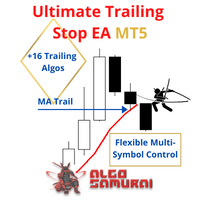
Ultimate Trailing Stop EA MT5
| 作者 | BLAKE STEVEN RODGER |
| 版本 | v2.92 |
| 更新 | 2021-11-08T04:56:18 |
| 激活数 | 6 |
| 原价 | $100 USD |
Moreover, you can add (override) stop loss, take profit and breakeven, add three partial take profit levels, and manage basket close in total dollar profit or loss, and/or percent drawdown or up draw.
Visualize all orders and their trailing stop levels in beautiful trade control panel. Visualize trailing SL (and open price & TP) on chart, and deploy mini trade panel for fast partial closing and order info.
For detailed description/tutorial, check out the blog.
How the Ultimate Trailing Stop EA is unique?
Most trailing stops classify as simple trailing stop systems that protect a fixed pip or percentage of the open trade profit, and some follow a single indicator. But this can:- Automatically trail your open positions using one of 16 trailing algorithms.
- Choose between a real or virtual trailing stop, and get out fully or partial percent, on bar touch or bar close.
- Manage unlimited open orders (manual or EA) of different symbols on one chart.
- Filter open orders based on symbol, magic number, comment, or ticket.
- Display all controlled orders in an advanced display showing each trade's open trade info and trailing stop levels, along with dynamically updating pips to level, pips & dollar profit.
- Visualize indicators on chart, along with open order arrows, pip & profit visual tracking.
- Basket Close in Total $ Profit | Total $ Loss | % Drawdown | % Updraw
- [NEW] Backtest / optimize CSV file of trade signal history to discover optimimal settings
How this expert advisor works
The working process looks like this:
-
You open any number of orders, manual or EA.
-
UTS monitors these orders and moves the SL value in favor of selected algorithm.
-
UTS closes all or part of the position at SL value.
Inputs:
Note: full tutorial in this blog.-
Trailing Stop Method — Choose from 16 different trailing stops.
-
Stop Loss Type — Choose between Real or Virtual Stop.
-
Touch or Close — Close on touch (default), or when Bar closes over(under) virtual stop. Close method works only when virtual stop is enabled.
-
Close Percent — Works with virtual to partially close your position at a desired percent.
-
Threshold in Pips or ATR — Start trailing stop when your trade reaches X pips in profit.
-
StopLoss in Pips or ATR- Set the SL in pips or atr multiplier
-
TakeProfit Pips or ATR - Set the TP in pips or atr multiplier
-
Breakeven in Pips or ATR - Set the BE in pips or atr multiplier
-
Indicator Settings :
-
Filter (Symbol, Magic Number, Comment, Ticket) — With dropdown menu: None, Equal, Not Equal, Contain, Not Contain. These filters allow you to include (exclude) specific symbols, magic numbers, comments, tickets or parts of them. For example, if Symbol contains USD, you will trade all USD based symbols. If Magic Number equals 80260, 40260, you will manage only these magic numbers.
安全须知
本产品仅通过 MQL5.com 官方渠道获取。其他渠道版本可能缺少完整功能和技术支持。
EA 配置
| 交易品种 | XAUUSD |
| 时间框架 | H1 (推荐) |
| 推荐经纪商 | IC Markets, IC Trading |
| 最低存款 | $300 / 0.01手 |
📸 截图预览