📝 产品详情
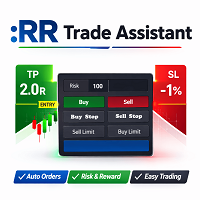
RR Trade Assistant
| 作者 | Calvin Andile Mahlangu |
| 版本 | v1.15 |
| 更新 | 2026-03-16T05:43:07 |
| 激活数 | 5 |
RR Trade Assistant is a utility Expert Advisor for MetaTrader 5 designed to help traders visually define trades and manage risk efficiently.
This tool combines a graphical risk-reward interface with manual trade execution, allowing traders to easily set trade parameters directly on the chart.
Users can define Entry, Stop-Loss, and Take-Profit levels, calculate lot size based on risk percentage, and execute trades directly from the control panel.
Key Features
Visual Risk-Reward Tool
Drag rectangles and lines directly on the chart to define Entry, Stop-Loss, and Take-Profit zones.
Risk-Based Lot Calculation
Automatically calculates lot size according to the selected risk percentage or fixed lot size.
Integrated Order Execution Panel
Place market orders or pending orders directly from the control panel.
Synchronized Inputs
Panel inputs and chart objects update in real time, ensuring consistency between visual elements and parameters.
Adjustable Visual Interface
Resize the risk-reward tool and adjust label sizes for better chart visibility.
Order Type
Select the order type: Market, Limit, or Stop orders.
Entry Price
Set the entry level manually or drag it directly on the chart.
Stop-Loss and Take-Profit
Define levels visually on the chart or input them manually.
Risk Mode
Choose between percentage risk based on account balance or fixed lot size.
Risk-Reward Ratio
Automatically calculates the reward relative to the defined risk.
Visual Scale
Adjust the size and font of the risk-reward tool for better clarity.
Quick Start (Important)
Follow these steps to ensure the EA works correctly:
- Drag RR Trade Assistant onto your chart
- In the settings window, enable “Allow Algo Trading”
- Click OK to attach the EA
- Enable the main Algo Trading button in MT5 (top toolbar must be green)
- Use the panel to place a trade
After attaching the EA check the following
- Check the “Experts” and “Journal” tabs for error messages
- Make sure your lot size meets broker requirements
- Ensure Stop-Loss / Take-Profit are not too close to price
- Confirm the market is open for the symbol
It is recommended to test RR Trade Assistant on a demo account before using it on a live account in order to become familiar with the tool and optimize settings.
If you like the RR Trade Assistant tool and find it helpful, please consider leaving a positive review or 5-star rating on the MQL5 Market. Your feedback helps me improve the tool and create even better trading utilities for the community. Thank you for your support!
安全须知
本产品仅通过 MQL5.com 官方渠道获取。其他渠道版本可能缺少完整功能和技术支持。
EA 配置
| 交易品种 | XAUUSD |
| 时间框架 | H1 (推荐) |
| 推荐经纪商 | IC Markets, IC Trading |
| 最低存款 | $300 / 0.01手 |
📸 截图预览