📝 产品详情
OneClick Wonder
| 作者 | Hajime Tsuro |
| 版本 | v1.12 |
| 更新 | 17 十二月 2025 |
| 激活数 | 5 |
| 原价 | $30 USD |
OneClickWonder manages open trades by Magic Number and Symbol, providing:
· Individual or Basket Trailing Stop
· Optional Averaging system (adds new trades automatically)
· OneClickOrder buttons (BUY / SELL directly from chart)
· Works with manual trades (Magic 0) or EA trades by number.
EA Features
1. Basket Trailing
o Groups trades with the same Magic Number and direction.
o Stop Losses are adjusted based on weighted average price of the basket.
2. Averaging
o Opens additional trades if price moves against the basket.
o Distance between trades increases progressively (AveragingDistanceStep).
o Lot sizes can scale with total lots of the existing basket (AveragingLotFactor).
o Maximum number of averaging trades limited by MaxAveraging.
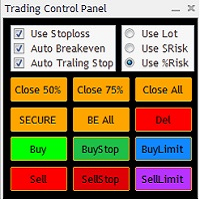
4. OneClickOrder Buttons
o Place market BUY/SELL orders directly on the chart.
o Panel allows custom Lot and Magic Number.
o Useful for testing or manual trading alongside EA management.
5. Dynamic Pip Calculation
o Automatically detects pip size for Forex, metals (XAU/XAG), oil (WTI), and crypto pairs.
o Ensures correct trailing and averaging distances across instruments.
6. Auto-Cancel of Pending Orders
o When all positions of the managed symbol and Magic Number are closed (including manual trades if Magic = 0), any remaining pending orders opened by the EA are automatically canceled.
o Prevents leftover pending orders after manual closures.
7. Duplicate Order Protection
o Before placing new averaging orders, the EA checks for existing pending orders at or near the same price (±0.5 pip tolerance).
o Prevents duplicate pending orders caused by fast ticks or reinitialization.
⚙️ Setup Steps
1. Attach the EA to the chart of the currency pair you want to manage.
o Example: Attach to EURUSD chart to manage EURUSD positions.
o It will control only trades of that symbol and TargetMagicNumber.
2. Configure parameters in the input window.
3. Optional: Use OneClickOrder panel to manually open trades.
? Parameter Guide
| Parameter | Description | Example / Notes |
| TargetMagicNumber | Magic number to target. Set 0 for manual trades. | 12345 |
| TargetSymbol | Symbol to target. Blank = current chart. | "" |
| TrailingStart | Profit in pips before trailing begins. | 30 (can be negative) |
| TrailingStep | Step in pips for moving the stop. | 30 |
| AveragingDistance | Base pip distance for first averaging trade. | 60 |
| AveragingDistanceStep | Multiplier for subsequent averaging distances. | 1.5 |
| AveragingLotFactor | Lot factor for new averaging trade. | 1.0 |
| MaxAveraging | Maximum number of averaging trades allowed. | 4 |
| UserComment | Custom comment for orders. | "OneClickWonder" |
Tips for Users
- Ensure TargetMagicNumber matches your trades if running on a multi-EA setup.
- Metals, oil, and crypto instruments have different pip sizes; the EA auto-detects pip value.
- Use a unique UserComment to distinguish trades opened by this EA.
⚠️ Important Notes
· Works per chart and Magic Number. Attach separate instances for each pair.
· Avoid running multiple EAs on the same trades.
· Averaging can increase margin exposure — test with small lots first.
· Always test on demo accounts before live trading.
安全须知
本产品仅通过 MQL5.com 官方渠道获取。其他渠道版本可能缺少完整功能和技术支持。
EA 配置
| 交易品种 | XAUUSD |
| 时间框架 | H1 (推荐) |
| 推荐经纪商 | IC Markets, IC Trading |
| 最低存款 | $300 / 0.01手 |
📸 截图预览