📝 产品详情
Equity Target Dashboard
| 作者 | HANI MABAD |
| 版本 | v1 |
| 激活数 | 5 |
| 原价 | $40 USD |
? Your all-in-one equity manager, profit protector, and trading informer.
? Why Traders Love This Tool
-
✅ Hands-free profit protection → Automatically closes all open trades when your profit target (after commission) is hit.
-
? Precision targets → Works with exact % vs Baseline (1%, 3%, 5%, 10% … or custom values).
-
? Protects against drawdown → Commission is ignored when below baseline, applied only when equity > baseline.
-
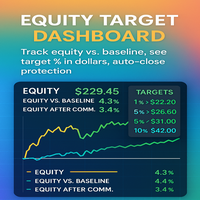
? Crystal-clear dashboard → See Equity, Balance, P/L, % vs Balance, % vs Baseline, and % After-Commission.
-
⚡ Smart auto-decision logic → Miss the popup? EA decides for you, with drift tolerance (avoid bad closes, lock good ones).
-
? Clean panels with colors → Neat panels you can place in any corner, with background + adjustable fonts.
-
? Fully customizable → All parameters adjustable (colors, offsets, spacing, targets, commission %, popup timeout, etc.).
-
? Single-file solution → Unlike others, this dashboard includes both the informer + auto-close logic — no need for a second EA.
? Feature Breakdown
? Equity Display
-
Shows big Equity number in the chart center or at custom XY coordinates.
-
Dynamic color changes:
-
Green if Equity > Balance
-
Yellow if Equity < Balance
-
Neutral color if equal
-
? Right-Side Stats Panel
-
? P/L row – Live floating profit/loss (with or without swap/commission).
-
? Equity % vs Balance – Quick health check of your account.
-
? Equity % vs Baseline – Compares current equity to your chosen baseline (e.g., 220).
-
? Equity % vs Baseline After-Commission – Uses your commission % for real-world accuracy.
-
⚙️ Optional rows: Leverage & Symbol Bid/Ask.
? Target Panel (1%, 3%, 5%, 10% …)
-
Displays percentage levels (customizable).
-
Shows corresponding equity in USD (with $ sign).
-
Starts in default color (e.g., grey) → turns green when reached.
-
Your selected Main Target changes to cyan for quick visibility.
-
Works after commission → so targets are realistic.
? Trade Closure Logic
-
Enable_TradeClosure – Master switch to allow/disable closure.
-
AskBeforeClose – Show popup: “Close ALL positions?”.
-
AskTimeoutSec – Seconds to wait for answer.
-
DriftTolerancePct – Auto-decision band:
-
Profit drift ↑ → auto-close ✅
-
Loss drift ↓ → skip ❌
-
Small drift → close ✅
-
-
AutoCloseWithoutAsk – Instantly close when target hit, no popup.
? Commission-Aware Calculations
-
? Below Baseline → Commission ignored.
-
? Above Baseline → Commission applied before target check.
-
Ensures real profit is locked.
? Panels & Graphics
-
? Adjustable to any corner (TL/TR/BL/BR).
-
? Customizable background, border, font colors.
-
? Font size, line spacing, and padding parameters.
-
⚡ Lightweight code — no chart lag.
? Setup Guide
-
? Attach the utility to any chart (any symbol).
-
⚙️ In Inputs, set:
-
Equity_Base_Value → your baseline (e.g., account balance start).
-
CommissionPercent → avg. commission/fees.
-
TargetPercent → main profit % goal (after commission).
-
Enable_TradeClosure → true if you want positions closed, false for informer only.
-
AskBeforeClose → true for popup, false for automatic.
-
AskTimeoutSec → e.g., 60 seconds.
-
DriftTolerancePct → e.g., 1.0 (protects from whipsaws).
-
AutoCloseWithoutAsk → true for instant closure.
-
-
? Adjust panel positions, colors, and fonts to your liking.
-
✅ Done! The dashboard tracks everything in real time.
? Best Use Cases
-
? Day traders → Lock in daily profit goals automatically.
-
? Swing traders → Protect equity against sudden drawdowns.
-
? EA users → Add an equity-level “guardian” over multiple strategies.
-
? Manual traders → Monitor account health clearly while focusing on the chart.
-
? Small accounts → Critical protection when every % counts.
? Categories on MQL5.com
This utility should be listed under:
-
Risk management
-
Order management
-
Informers
-
Panels
? Why Equity Target Dashboard?
Because it’s not just an informer.
It’s not just an auto-closer.
It’s the fusion of both —
✅ A professional dashboard
✅ A smart auto-closure engine
✅ Fully customizable risk protection
? Control your equity. Protect your profits. Trade smarter.
安全须知
本产品仅通过 MQL5.com 官方渠道获取。其他渠道版本可能缺少完整功能和技术支持。
EA 配置
| 交易品种 | XAUUSD |
| 时间框架 | H1 (推荐) |
| 推荐经纪商 | IC Markets, IC Trading |
| 最低存款 | $300 / 0.01手 |
📸 截图预览