📝 产品详情
OneClick Copier for MT4
| 作者 | HANI MABAD |
| 版本 | v3 |
| 激活数 | 5 |
| 原价 | $30 USD |
ONECLICK COPIER EA – UNIFIED VERSION 1.0
Category: Trade Utility | Type: Local Trade Copier for MT4
Created by fxdancer (Hani Mabad)
Version: 1.0 – May 2025
OVERVIEW
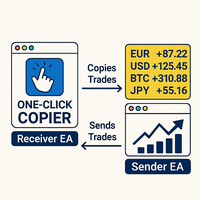
OneClick Copier EA is a local trade copying utility, not a trading strategy.
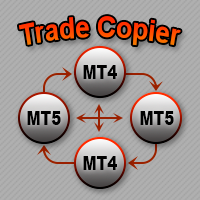
It is designed for manual traders, fund managers, or multi-account users who want to mirror trades across MT4 terminals running on the same computer.
This EA does not generate signals or place trades by itself.
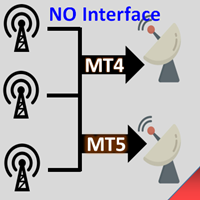
Instead, it acts as a bridge between accounts: one instance sends trade data (Sender), and another receives and replicates them (Receiver).
Key Clarification for Moderators and Users:
- This EA is a utility tool, not an expert advisor in the strategy sense.
- No trading logic is built in.
- It requires manual input or trades placed on the Sender terminal to function.
USE CASES
-- Manage multiple MT4 accounts from one master terminal
-- Mirror manual trades between brokers
-- Scale trade sizes based on account equity
-- Safely isolate signal execution from risk accounts
KEY FEATURES
-- One file does both: works as Sender or Receiver based on selected Mode
-- Fast and reliable local copying via shared file system
-- Supports BTC, Gold, Forex, and most CFD instruments
-- Adjustable slippage for BTC to handle high-spread brokers
-- Equity scaling, risk multiplier, and max lot filters on Receiver
-- Auto-close orphan trades or missing signals
-- Built-in suffix matcher for cross-broker compatibility
-- Organized input sections (Shared, Sender, Receiver) for easy use
-- No DLLs or external dependencies
-- Compatible with Windows terminal, VPS, and portable MT4 setups
HOW TO USE
1. Install EA to both accounts (Sender and Receiver terminals)
- Navigate to File > Open Data Folder > MQL4 > Experts
- Place the compiled .ex4 file there and restart MetaTrader
2. Attach EA to a chart (any timeframe)
- On the Sender account, choose Mode = Sender
- On the Receiver account, choose Mode = Receiver
3. Allow DLL and live trading
- Enable “Allow Algo Trading” in MetaTrader toolbar
- In the EA’s settings, check “Allow Live Trading” and “Allow DLLs”
4. Make sure both terminals use the same Data Folder or are on the same PC
5. Place trades on Sender – they’ll be copied to Receiver instantly
INPUT PARAMETERS
Shared Settings
-- Mode: Choose between Sender or Receiver (drop-down list)
-- FilePrefix: Prefix for internal signal files (default: TradeSignal_)
-- MagicPrefix: Base for unique magic numbers
-- SymbolSuffix: Optional suffix for Receiver (e.g. "m", "pro", "x")
Sender Settings
-- ScanIntervalMS: Frequency in milliseconds to check for trades
-- RemoveSuffixBeforeSend: If true, removes known suffixes to match symbol name (recommended true)
Receiver Settings
-- WatchSymbols: Comma-separated list of symbols to monitor
-- UseEquityScaling: Scale lot size based on master/slave equity ratio
-- LotMultiplier: Additional multiplier applied to received lot size
-- MasterEquity: Sender account reference equity
-- MaxLotsPerTrade: Cap receiver’s lot size per trade
-- RiskFactor: Risk scaling factor (combined with equity and multiplier)
-- SlippageBTC: Slippage in points for BTC trades (e.g. 5000 for $50)
-- ShowCommentOnChart: If true, display last copied comment
-- EnableAutoCloseMissingTrades: Automatically close trades not updated in X seconds
-- MissingTradeTimeoutSeconds: Time window to detect missing updates
-- EnableForceCloseIfNoSenderTrades: Close all copied trades if no signals received in X seconds
-- NoSenderTimeoutSeconds: Time window to detect full signal loss
NOTES & LIMITATIONS
-- Backtesting not supported: This EA relies on shared files, which do not function in the Strategy Tester
-- EA must be installed on terminals running on the same machine
-- For BTC symbols, ensure both brokers allow BTC trades and have acceptable spreads
-- Avoid using terminals from different operating systems (e.g. one on Linux/Wine)
-- Works best when both terminals are active and unlocked
TROUBLESHOOTING BTC TRADE COPY
-- If BTC is not copied, verify that:
- Symbol names match or suffix is provided
- Slippage is set high enough (try 5000 or more)
- Spread on the receiver broker is not abnormally large
-- Enable logs in the Experts tab to diagnose mismatches or failures
VERSION INFO
- Version: 1.0 (Initial Market Release)
- Date: May 2025
- Developer: fxdancer (Hani Mabad)
- Product Name: OneClick Copier EA – Unified
安全须知
本产品仅通过 MQL5.com 官方渠道获取。其他渠道版本可能缺少完整功能和技术支持。
EA 配置
| 交易品种 | XAUUSD |
| 时间框架 | H1 (推荐) |
| 推荐经纪商 | IC Markets, IC Trading |
| 最低存款 | $300 / 0.01手 |
📸 截图预览