📝 产品详情
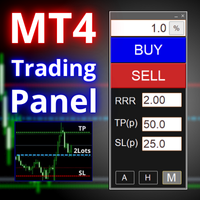
Trading Panel MetaTrader 4
| 作者 | Stanislav Valis |
| 版本 | v1.0 |
| 激活数 | 5 |
| 原价 | $39 USD |
FX-Support Presents the Trading Panel for MT4
The Trading Panel for MT4 is a powerful and versatile tool designed to assist traders in their daily trading activities. It helps traders open positions and identify market signals, such as ENG and STAR patterns. The panel simplifies decision-making and supports efficient trading.
Key Features:
-
Automatic Lot Size Calculation
Calculates lot sizes accurately, considering market conditions and currency conversions for effective risk management. -
Accurate Stop-Loss and Take-Profit Settings
Enables quick and precise SL and TP adjustments using keyboard shortcuts, saving time and improving accuracy. -
Signal Detection
Recognizes ENG and STAR patterns to identify potential trading opportunities. -
User-Friendly Interface
Provides an intuitive design for fast and easy operation in any market environment. -
Drawing Tools
Allows drawing directly on charts through an intuitive interface, ideal for personalized analysis.
IMPORTANT INFORMATION:
The lot size calculation works only for:
- Trading accounts in the following currencies: USD, EUR, CHF, CZK.
- Instruments including the entire forex market, commodities, indices, and stocks with margin currency USD or EUR.
⚠️ Note: If the account currency or instrument is not supported by the panel, an alert with an error message will appear.
The lot size calculation based on a fixed risk amount is oriented to the main currency of the trading account.
List of Keyboard Shortcuts:
- Key S – Creates SL (Stop-Loss) and TP (Take-Profit) lines on the chart and switches the panel to MANUAL mode.
- Key P – Creates a PENDING order line on the chart and switches the panel to MANUAL mode.
- Key L – Shows or hides SL and TL lines (ONLY in ACTUAL and HISTORY modes).
- Key M – Minimizes or maximizes the panel.
- Key K – Toggles drawing mode on or off.
Additional Resources and Support:
? Watch a detailed video tutorial on how to use the panel on our YouTube channel: https://youtu.be/iZ3r5axWf3I
? Visit our official website: www.fx-support.com
For technical issues or questions, please contact our support team via email: info@fx-support.com . We’re here to help!
Disclaimer:
Trading in financial markets is highly risky and may result in the loss of your entire capital, including losses exceeding your initial investment. Past performance is not indicative of future results. Users are fully responsible for configuring the software, managing their risk, and ensuring compliance with their local regulations.
Products provided by FX-Support are intended to assist with market analysis, trade facilitation, and automation. While every effort is made to ensure quality and reliability, FX-Support does not guarantee flawless operation or suitability for all trading strategies. By using FX-Support products, you accept full responsibility for any associated risks and confirm your understanding of this disclaimer.
安全须知
本产品仅通过 MQL5.com 官方渠道获取。其他渠道版本可能缺少完整功能和技术支持。
EA 配置
| 交易品种 | XAUUSD |
| 时间框架 | H1 (推荐) |
| 推荐经纪商 | IC Markets, IC Trading |
| 最低存款 | $300 / 0.01手 |
📸 截图预览