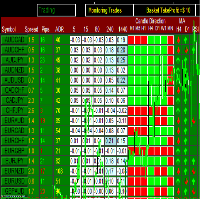
| Use the default 28 pairs = | true/false | Default 28 pair select by developer |
| Comma separated own pair list | EURUSD,GBPUSD,XAUUSD,US30 | Your Own pair select here. Comma use for separated |
| Dashboard update interval | 0/1/5 | Dashboard update ( refresh) time select here |
| Magic Number | 369999 | |
| Auto Trade | true/false | Select "true" if you want to trade auto. Otherwise select "false" for manual trade. |
| Use Pips | true/false | Pips are the grid between two trades. |
| Minimum pips to open position | 20 | How much you want grid … |
| Timeframe for Strength Calculations | D1 | currency strength calculation with time frame. Use H1 to higher…. |
| Use Strength filtering | true/false | |
| Minimum % Strength to open position | 80 | Select % of currency strength |
| Use Candle Direction | true/false | Check candle direction Up side or down side |
| Use Moving Average | true/false | select moving average |
| Moving Average Period | 21 | select moving average period |
| Use RSI | true/false | Select RSI |
| RSI Period | 14 | Select RSI Period |
| Use CCI | true/false | Select CCI |
| CCI Period | 14 | Select CCI Period |
| CCI Buy Level | 100 | |
| CCI Sell Level | -100 | |
| Use Heat Map 1 | true/false | Select Heat Map on/off |
| Timeframe for Heat Map 1 | 5 | Select a time frame for the heat map. There are already 5 time frames added here. Only select you true/false…. |
| Lot Size | 0.01 | Select lot size for trading |
| Max trades per pair | 3 | Add here how much you want to trade per pair. |
| Max total trades overall | 0 | Add here how much you want to trade with all pair. If select 0 = disable |
| Max Spread Allowe | 20 | Select spread as per your broker |
| Basket Take Profit in $ | 5 | All basket trades will be closed if the total profit is more than you selected. If select 0 = disable |
| Basket Stop Lloss in $ | 0 | All basket trades will be closed if the total loss is more than you selected. If select 0 = disable |
| At profit 1 | 1 | If there is more trade profit than you selected, your trade profit will be locked at the profit selected below. |
| Lock 1 | 0.5 | 6 Lokas are given here. |
| Trail the last set lock | true/false | |
| Trail distance 0 means last lock | 0 | |
| Stop after this many profitable baskets | 0 | EA will be closed after making profit. |
| Takeprofit percent adr(10) 0=None | 10 | ADR trailing |
| Stoploss adr percent adr(10) 0 = None | 40 | ADR trailing |
| Stop after this many losing baskets | | EA will be closed after making Loss. |
| Only adds trades in profit | true/false | A new trade will take place only if the last trade was in profit. |
| Close all trades after session(s) | true/false | Select here to close all session trades after the session ends. |
| Use Session 1 | true/false | Select a session here for auto trading. |
| Session 1 Start | 0:00 | Select US, London or any other time as per your broker/server time here. |
| Session 1 End | 23:59 | Here given three sessions in which you can choose different time. |
| TimeFrame to open new chart | 60 | If you select any pair in the dashboard, a new chart will open in a separate window. |