📝 产品详情
Sessions by Lux
| 作者 | Minh Truong Pham |
| 版本 | v17 |
| 更新 | 18 三月 2024 |
| 激活数 | 5 |
| 原价 | $49 USD |
The indicator will increasingly lack accuracy when the chart timeframe is higher than 1 hour.
Settings
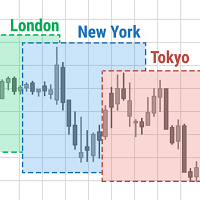
Sessions
- Enable Session: Allows to enable or disable all associated elements with a specific user set session.
- Session Time: Opening and closing times of the user set session in the hh:mm format.
- Range: Highlights the associated session range on the chart.
- Trendline: Returns the associated session trendline on the chart.
- Mean: Returns the associated session mean average on the chart.
- VWAP: Returns the associated session volume weighted average price on the chart.
Ranges Settings
- Range Area Transparency: Transparency of the area highlighting sessions ranges.
- Range Outline: Highlights the borders of the session range area.
- Range Label: Shows the session label at the mid-point of the session interval.
Dashboard
- Show Dashboard: Enables sessions dashboard on the chart.
- Advanced Dashboard: Returns more information regarding user set sessions on the dashboard.
Dividers
- Show Session Divider: Highlights active sessions using intervals on the bottom of the chart (this can lead to less responsive charts)
- Show Daily Divider: Highlights days on the chart.
Usage
This tool is versatile and allows the user to perform a wide variety of tasks all focusing on highlighting and analyzing price movements within a specific user set session in a periodic fashion.
Significant forex trading sessions are used by default, but the users are free to choose the opening and closing time of their choices.
Using The Advanced Dashboard
The advanced dashboard returns useful information regarding the user set sessions. Each dashboard elements are described below:
- Status: Highlights whether the user set session is active (open) of inactive (closed).
- Trend: Shows correlation coefficient between the session prices and a linear sequence of values. Values above 0 indicates an up-trending session, while values under 0 indicates a down-trending session. Values closer to (1, -1) indicates a more trending session.
- Volume: Shows accumulated volume within the session
- σ (Standard Deviation): Shows standard deviation of the session, while this value is not bounded it can be useful to compare it with the other ones to see which session was the most volatile.
Note that when a session becomes inactive the value on the dashboard will hold until the specific session becomes active again.
安全须知
本产品仅通过 MQL5.com 官方渠道获取。其他渠道版本可能缺少完整功能和技术支持。
EA 配置
| 交易品种 | XAUUSD |
| 时间框架 | H1 (推荐) |
| 推荐经纪商 | IC Markets, IC Trading |
| 最低存款 | $300 / 0.01手 |
📸 截图预览