📝 产品详情
Position Size Tool
| 作者 | Filipp Pavlov |
| 版本 | v1.3 |
| 更新 | 2025-08-10T23:56:38 |
| 激活数 | 10 |
| 原价 | $60 USD |
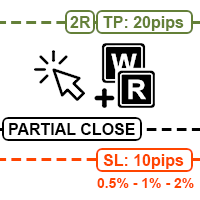
Position Size Tool is an on-chart trading tool that lets you manage trades entirely with your mouse and hotkeys — switch between preset risk percentages, place orders with instant position sizing, see live SL/TP distances and risk/reward, and close positions partially with a click.
Key Features:
- Market/pending orders by mouse & hotkeys with auto risk-based sizing.
- Change risk % with A/S hotkeys.
- Change auto take profit distance with Z/X hotkeys.
- Partial close via on-chart buttons.
- Auto place TP based on risk/reward ratio.
- Show SL/TP distance, margin, spread.
- Customizable interface — show only what you need.
FAQ:
1. Market order
Press Qto enter market order mode.
Move your mouse to the desired Stop Loss level.
Use A / S to adjust risk percentage.
Press Rto send the order.
2. Pending order
Move your mouse to the desired entry price, then press W.
Next, move the mouse to the desired Stop Loss level.
Use A / S to adjust risk percentage.
Press Rto send the pending order.
The EA will automatically choose between limit and stop order types based on the position of the SL relative to the entry.
3. Partial close
For open positions, a partial close button appears on the chart.
Click it to close 50% of the position (by default).
Click the icon next to it to open a selector, where you can choose a different amount to close.
The selector is generated based on the number of steps you set in the settings.
Installation:
- Tools > Options > Expert Advisors. Allow algorithmic trading is enabled.
- Algo Trading button on top is enabled.
- In Properties of Position Size Tool > Common tab > Allow Algo Trading is enabled .
安全须知
本产品仅通过 MQL5.com 官方渠道获取。其他渠道版本可能缺少完整功能和技术支持。
EA 配置
| 交易品种 | XAUUSD |
| 时间框架 | H1 (推荐) |
| 推荐经纪商 | IC Markets, IC Trading |
| 最低存款 | $300 / 0.01手 |
📸 截图预览