📝 产品详情
Trade Manager Interface MT5
| 作者 | Peter Mueller |
| 版本 | v3.13 |
| 更新 | 2023-11-19T23:57:56 |
| 激活数 | 5 |
The Trade Manager Interface is a free utility designed to simplify manual trading in MetaTrader.
MT4 Version Available Manual +Free Strategy
Please leave a review, if you like the trade manager.
It allows traders to visualize trades directly on the chart, calculate position size automatically, and manage orders with advanced features such as partial take profits, automatic breakeven, and trailing stops.
For more advanced features check out: ManHedger
This tool focuses on risk control and execution precision, making trade management faster and more efficient.
For the advanced trade management features to function correctly, please keep the Expert Advisor running after opening a trade.
Watch the explanatory video for a complete walkthrough.
Key Features
-
Two operation modes: Trade and Close
-
Full visual trade setup on the chart (entry, stop loss, take profit)
-
Risk- or volume-based position sizing
-
Stop loss and take profit display in points, percentage, or price levels
-
Automatic Breakeven and Trailing Stop functions
-
Fixed Risk/Reward Ratio lock option
-
Up to three Partial Take Profits with customizable distances and volumes
-
Adjustable lines by dragging directly on the chart
How It Works
-
Open the Trade Manager panel on your chart.
-
Select the trading direction: Long (Buy) or Short (Sell).
-
Specify the Entry Price, Stop Loss, Take Profit, and Volume parameters.
-
Volume can be defined by lots, percentage of balance, or fixed monetary value (meaning margin used).
-
-
Optionally activate Auto Breakeven, Trailing Stop, or Partial Take Profits for automated management.
-
Click Open Trade to execute a market or pending order automatically based on the entered parameters.
The interface also provides the “Display Lines” option, allowing you to visualize and modify trade levels directly on the chart.
When a level is moved, the panel instantly updates to show the new point and percentage values relative to the entry price. It's important to note, that each trade will be executed based on the parameters in the DIALOG, and not based on the visualization.
Close Mode
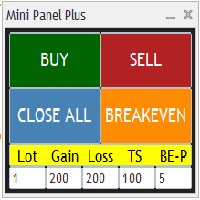
This mode allows users to close trades and delete orders based on their type with the click of buttons.
Some buttons in the close mode include:
- Close ALL
- Close Open
- Close Profit
- Close Loss
- Delete Pending
Could not hurt to check out:
Best Free MT5 Supply and Demand indicator
#tags trading panel partial takeprofit auto be automatic breakeven close all, delete pending, close manager risk reward ratio trailing stoploss trading manager
安全须知
本产品仅通过 MQL5.com 官方渠道获取。其他渠道版本可能缺少完整功能和技术支持。
EA 配置
| 交易品种 | XAUUSD |
| 时间框架 | H1 (推荐) |
| 推荐经纪商 | IC Markets, IC Trading |
| 最低存款 | $300 / 0.01手 |
📸 截图预览