📝 产品详情
On Chart Watchlist
| 作者 | Omkar Dilip Pathak |
| 版本 | v1.1 |
| 更新 | 2026-01-03T18:10:51 |
| 激活数 | 0 |
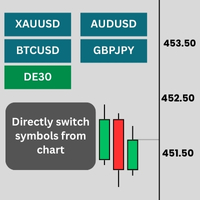
Stop wasting screen space with the bulky standard Market Watch window. On Chart Watchlist places a sleek, customizable dashboard directly on your chart, allowing you to scan markets and switch symbols with a single click.
Designed for manual traders, scalpers, and anyone who needs to navigate multiple pairs quickly, this tool keeps your workspace clean and your focus on the price action.
Key Features
- ? Instant Switching: Click a button to instantly change the current chart to that symbol.
- ? Auto-Sync Mode: Automatically fetches symbols from your MT5 Market Watch. If you add or remove a symbol in MT5, the panel updates automatically in real-time.
- ? Custom List Mode: Prefer a static list? Type in your specific pairs (e.g., "EURUSD, BTCUSD, US30") to keep a fixed watchlist.
- GridView System: Organize 10, 50, or 100+ symbols neatly. Set row or column limits to wrap buttons automatically into a perfect grid.
- ? Fully Customizable: Change button size, font size, colors, and corner position (Top-Left, Bottom-Right, etc.).
- ? Active State Logic: The button for the currently active symbol highlights automatically so you always know where you are.
Settings / Inputs
- Source: Choose between Custom List or Auto-Fetch Market Watch .
- Orientation: Choose Vertical (columns) or Horizontal (rows).
- Grid Limit: Max buttons per row/column before starting a new line.
- Position: Anchor to any corner of the screen.
- Smart Styling: Auto-adjusts positioning for cleaner looks on the right-side of the chart.
How to Use
- Attach the indicator to a chart.
- Select "Auto-Fetch" to mirror your Market Watch, or select "Custom" to type your own pairs.
- Click any button to switch the chart to that asset.
安全须知
本产品仅通过 MQL5.com 官方渠道获取。其他渠道版本可能缺少完整功能和技术支持。
EA 配置
| 交易品种 | XAUUSD |
| 时间框架 | H1 (推荐) |
| 推荐经纪商 | IC Markets, IC Trading |
| 最低存款 | $300 / 0.01手 |
📸 截图预览