📝 产品详情
VM Auto SLTP Pro
| 作者 | Van Minh Nguyen |
| 版本 | v3.6 |
| 更新 | 2025-10-19T12:49:11 |
| 激活数 | 10 |
| 原价 | $50 USD |
Overview:
VM Auto SLTP Pro is a professional upgrade to the VM Auto SLTP Basic edition, built to deliver robust performance, advanced trade management tools, and an intuitive on-chart control panel. This Expert Advisor automatically sets and manages Stop Loss (SL) and Take Profit (TP) levels for existing positions — whether opened manually or by other EAs — using ATR-based, fixed-point, fixed-price, or USD-based rules.
VM Auto SLTP Pro acts as a trade-management assistant that protects profits, limits losses, and helps you apply consistent, disciplined risk control across your account or on a single symbol.
Key Features:-
Flexible SL/TP modes: ATR-based, fixed points, fixed price, and USD-based SL/TP.
-
Comprehensive risk protection: Equity/percentage-based closures, profit/loss thresholds, and maximum order limits.
-
Advanced trailing & partial management: Trailing stop by multiples of initial risk (R), automatic breakeven, and partial profit-taking.
-
On-chart Visual Panel: Real-time monitoring and one-click trade actions directly on the chart.
-
Two operation modes: Single-symbol (recommended) and account-wide management.
-
Universal compatibility: Works with manual orders and orders opened by other Expert Advisors.
-
Max Bars Open Settings: allows enabling/disabling and limiting the maximum number of bars a position can remain open.
-
Smart Close Settings: intelligent auto-close mechanism based on the selected timeframe (SmartCloseTimeframe), using EMA and RSI (SmartClose_EMA_Period, SmartClose_RSI_Period).
- Supports pending orders Buy Limit, Sell Limit, Buy Stop, and Sell Stop, with enable/disable option and on-chart visualization of Entry, SL, and TP using customizable colors and line styles.
1. Dynamic and Fixed Stop Loss / Take Profit
ATR-Based SL/TP
Stops and targets adapt to market volatility using the Average True Range (ATR) indicator.
Key Parameters: ATR_Period, ATR_SL_Multiplier, ATR_TP_Multiplier.
Benefit: Market-aware risk management that tightens stops in calm markets and widens them during high volatility.
Fixed SL/TP in PointsSet your Stop Loss and Take Profit as static, fixed-point distances from your entry price.
Key Parameters: Fixed_SL_Points, Fixed_TP_Points.
Benefit: Straightforward and consistent risk-reward ratios on every trade.
Fixed Price SL/TPSet your Stop Loss and Take Profit using absolute price levels entered by the user. The EA automatically validates the entered prices according to the order type.
Key Parameters: UseFixedPriceSLTP, Fixed_SL_Price, Fixed_TP_Price.
Benefit: Precise control of SL/TP at the exact desired price; ensures validity of price levels for each order type.
USD-based SL/TPSet your Stop Loss and Take Profit based on a specific USD amount. The EA automatically converts that amount into the required price distance according to the symbol and lot size.
Key Parameters: UseUSDSLTP, USD_SL, USD_TP.
Benefit: Manage risk by a fixed monetary value, making capital control easier and suitable for any trading strategy.
2. Comprehensive Risk Management SystemProtect your trading capital with multiple, configurable safety layers:
-
Close by Profit/Loss (USD): Close all trades when total profit or loss reaches a specified USD amount. (CloseByUSD)
-
Close by Account Percentage: Close all trades when P/L reaches a set percentage of account balance. (CloseByPercent)
-
Maximum Order Limit: Restrict the maximum number of open trades per symbol or across the account. (Max_Orders_Per_Symbol, Max_Orders_Account)
-
Average Profit Target: Close managed trades when the average profit per trade (in points) reaches a predefined target. (Avg_Profit_Target_Points)
These safeguards are fully configurable so you can tailor protection to your risk tolerance and trading style.
3. Advanced Trade Management Trailing Stop by RThe trailing stop activates when a trade’s profit reaches a multiple of your initial risk (R). The Stop Loss then trails the price in defined steps, locking in profits while allowing the remaining run toward your final TP.
Key Parameters: Trailing_R_Trigger, Trailing_Step_Points, Trailing_Min_Distance.
Partial Profit TakingAutomatically close a configurable percentage of position volume at profit levels defined in multiples of R. Secure gains while letting the remainder run.
Key Parameters: Partial_Close_Enabled, Partial_Close_Percent, Partial_Close_Levels.
Smart BreakevenAutomatically move the Stop Loss to breakeven (entry price plus optional buffer) once the trade moves a certain distance in your favor, preventing winners from turning into losers.
Key Parameters: Breakeven_Trigger_Points, Breakeven_Buffer_Points.
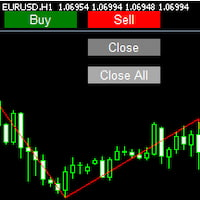
4. Integrated Visual Control PanelAn on-chart control panel gives you full visibility and direct control:
Displayed Information: EA Status, Attached Symbol, Spread, Number of Managed Trades, Total Profit, and Mode.
One-Click Actions:
-
START/STOP — Pause or resume EA operations.
-
BUY/SELL — Open immediate market orders with auto SL/TP.
-
Close Last / Close All / Close All Losing — Fast order management.
-
All to Breakeven — Move SL to breakeven for all managed trades.
-
Toggle ATR/Fixed/Price/USD — Switch SL/TP mode quickly.
The panel provides instant feedback and quick action buttons to react to changing market conditions.
Scope of Operation-
Single-Symbol Mode (Recommended): The EA manages only trades for the chart it is attached to. This avoids conflicts with other EAs and is ideal for running multiple symbol-specific strategies.
-
Account-Wide Mode: The EA scans and manages all open positions across every symbol in the account for centralized portfolio-level control.
Choose the mode that best fits your workflow — we recommend starting with Single-Symbol Mode for maximum safety.
Why Choose VM Auto SLTP Pro?-
High Flexibility: Configurable to suit scalpers, swing traders, and portfolio managers.
-
Maximum Protection: Multi-layered safety rules reduce the risk of catastrophic losses.
-
User-Friendly: Fast, intuitive control directly on the chart.
-
Universal Compatibility: Works with manual orders and orders opened by other EAs.
-
Dual Modes: Focused single-symbol control or centralized account-wide management.
-
VM Auto SLTP Pro is a trade-management and risk-control tool, not a signal generator. Use it alongside your own strategy to enforce discipline and protect capital.
-
For safety, we strongly recommend using the default Operate only on attached chart (Single-Symbol Mode) when first deploying the EA.
-
Always test the EA in a demo environment before running on a live account to ensure settings suit your broker, symbol characteristics, and risk tolerance.
You can view the complete guide on how to use VM Auto SLTP Pro here: https://www.mql5.com/en/blogs/post/766471
For support, please leave a comment on the product page or send a private message to the developer on MQL5. Provide a clear description of your issue so we can assist you promptly.
安全须知
本产品仅通过 MQL5.com 官方渠道获取。其他渠道版本可能缺少完整功能和技术支持。
EA 配置
| 交易品种 | XAUUSD |
| 时间框架 | H1 (推荐) |
| 推荐经纪商 | IC Markets, IC Trading |
| 最低存款 | $300 / 0.01手 |
📸 截图预览