📝 产品详情
Money and Trade Manager Demo
| 作者 | Tobias Michael Kerner |
| 版本 | v1.0 |
| 激活数 | 78603 |
The Demo is limited to EUR/USD, but otherwise fully functional.
Features:
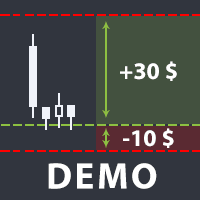
- easy positioning of stoploss and takeprofit with horizontal Assistance-lines
- automatic Volume calculation
- fixed risk, set by the trader
- Closing of all trades of one type, with the click of one button (long or short, for this symbol)
- Creation of pending orders with one click
- Direct feedback through responsive buttons
Made for all your needs:
- Forex
- Indices
- Crypto
- Gold, Silver, Platinum
- Working with all account-currencies
Reasons why this is the perfect Money Management Tool:
- No need to calculate position size ever again
- timeframe change mid use is supported -> Assistance-lines can be set more precisely in smaller/bigger timeframes
- very easy to use, fool proof
- You can fully focus on the actual setups
- Clean, resizable interface
- quick and easy resizing makes usage of multiple separate indicator windows possible
- usable on multiple symbols and charts at once
- thoroughly tested
- Active Support
How to load the MM:
- go to your MQL5 folder and put the ea into MQL5\Experts
- Enable Algo-Trading in Metatrader 5 (top left corner)
- Select a chart and run the ea file (in the top left corner, click on the tab "view" and enable "Navigator", search for the ea in the opened window and double-click on it, then it will automatically load in)
- ???
- Profit
How to use the features:
- Normal trades: create the red Assistance-lines (the one without "pending order" in the button text), move them where you want stoploss and take profit, then click either buy or sell
- Pending Orders: create the purple pending order Assistance-lines. Move the outer ones where you want stoploss and takeprofit and the middle one where your entry price should be at. Then click the type of pending order you would like.
- Close all buy positions: Click on "close buy" (this will close all buy-positions for this symbol)
- Close all sell positions: Click on "close sell" (this will close all sell-positions for this symbol)
安全须知
本产品仅通过 MQL5.com 官方渠道获取。其他渠道版本可能缺少完整功能和技术支持。
EA 配置
| 交易品种 | XAUUSD |
| 时间框架 | H1 (推荐) |
| 推荐经纪商 | IC Markets, IC Trading |
| 最低存款 | $300 / 0.01手 |
📸 截图预览