📝 产品详情
Orbit Trade Manager
| 作者 | Livinus Sunday Mama |
| 版本 | v3 |
| 激活数 | 5 |
| 原价 | $30 USD |
Trade Setup:
Panel-only mode available for traders who prefer to keep the chart clean and trade entirely from the minor panels
HOW TO USE THE APPLICATION
1. SETTING UP PARAMETERS.
Attach the EA by clicking on the name in the MT5 navigator. This will open the settings dialog box. Click on common and then check the enable Algo trading checkbox. By so doing you have enabled the EA to be able to place trade for you or perform other functions as you click the relevant buttons. It makes other action buttons on the main panel to work as well.
To setup other aspects of the application, click on input tab on the settings form to take you to the settings window. Set your account risk (a percentage of your account). Next, select whether the risk is applied based on account balance, equity or free margin by selecting from a list box that comes after the account risk. Set auto risk reward to true if you want the take profit to be set automatically by the EA based on the risk reward setting and the stop loss value.
If you want to implement breakeven, set use breakeven to true. Select whether breakeven will be based on RR, fixed pip or ATR multiple. Set a marginal buffer of profit after breakeven to ensure that you don't end up with a loss if the breakeven is hit due to spread and other trade charges. If you set ATR, set the ATR multiple in profit at which the breakeven will be triggered.
If you want to enable trailing stop, set use trailing stop to true. Select whether trailing shall be based on Parabolic SAR, fixed pip distance or ATR. Set the relevant parameters that applies to the trailing basis you have chosen, such as ATR multiple.
If you want the EA to implement partial profit taking, set use partial profit to true. Set the percentage of the open position to be closed when the trade moves to 2xSL and 3xSL.When you finish setting up the EA click on OK to save the settings. The EA is then loaded on the chart.
2. HOW TO PLACE TRADES.
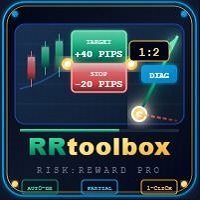
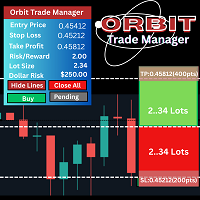
When the EA is successfully loaded you will see two panels displayed on the chart. The panel on the top left corner of the chart is the main panel and consists of two sections. A display section where trading information like market price, stop loss, take profit, lot size etc are displayed. An action button section containing just four buttons. The buttons are used to place trades and to perform other functions. The panel on the right side is called thetrade setup panel and it is sitting on top of three lines namely stop loss, price and take profit lines. It has two sections, a stop loss(red) section and a take profit section(green).Each side can be expanded by clicking and dragging their footer sections. Clicking and dragging the mid point moves the entire panel and the lines around the chart.
To place a BUY order, move the setup panel by clicking and holding the middle portion and position it at the price point. Ensure that the yellow price line covers the current price line. Drag the red stop loss side below the current price to where you want the stop loss to be based on price structure or some arbitrary distance from the price according to your trading strategy.The take profit will automatically be calculated and reflected on the take profit side based on the risk reward ratio.You can also manually adjust the take profit if you like by clicking and dragging it's panel footer Once you are satisfied, click on buy button on the main panel to execute the trade.
To place a SELL order, move the setup panel by clicking and holding it's middle portion and dragging it to the price point. Ensure that the yellow price line is placed to cover the current price line. Drag the red stop loss side above the current price to where you want the stop loss to be based on price structure or some arbitrary distance from the price according to your trading strategy. The take profit panel will automatically adjust to reflect the change in the stop loss according to the risk reward ratio. You can also manually adjust the take profit panel size if you like.Once you are satisfied with the setup, click on the Sell button on the main panel to place the trade.
To place a BUY STOP order, click on the pending off button on the main panel to set the pending order mode to on. Move the setup panel above the current price to a price point you have determined for the BUY STOP order.Ensure that the yellow price line is at the exact price for your BUY STOP order. Drag the red stop loss side below the yellow line to where you want the stop loss to be based on the price structure or an arbitrary distance from the yellow price line according to your trading strategy.The take profit will automatically adjust based on the risk reward ratio. When you aresatisfied with the setup click on the Place Buy Stop order on the main panel to place the order.
To place a SELL LIMIT order, click on the pending off button on the main panel to set the pending order mode on. Move the setup panel above the current price to the price point you have determined for the SELL LIMIT order.Ensure that the yellow price line is at the exact price of your SELL LIMIT order. Drag the red stop loss side above the yellow line to where you want the stop loss to be based on price structure or other arbitrary distance from. the yellow price line according to your trading strategy.The take profit will automatically be calculated and displayed on the take profit side based on the risk reward ratio. When you are satisfied, click on the Place Sell Limit order on the main panel to place the trade.
To place a SELL STOP order, click on the pending off button on the main panel to set the pending order mode to on. Move the setup panel below the current price to the price point you have determined for the SELL STOP order. ensuring that the yellow price line is at the exact pricefor your SELL STOP order. Drag the red stop loss side above the yellow line to where you want the stop loss to be based on price structure or some arbitrary distance from. the yellow price line according to your trading strategy. The take profit panel will adjust automatically to reflect the change based on the risk reward ratio. When you are satisfied, click on the Place Sell STOP order on the main panel to place the order.
To place a BUY LIMIT order, click on the pending off button on the main panel to set the pending order mode on. Move the setup panel below thrcurrent price to the price point you have determined for the BUY LIMIT order ensuring that the yellowprice line is at the exact price for your BUY LIMITorder. Drag the red stop loss side below the yellow line to where you want the stop loss to be. based on price structure or some arbitrary distance from theyellow price line according to your trading strategy. The take profit panel will adjust automatically to reflect the change based on the risk reward ratio. When you are satisfied, click on the Place Buy Limit order on the main panel to place the trade.
3. EMERGENCY CLOSE ALL
When you are in a trade and may be the the market turns against you or Your floating profit had reached your daily target and you wants to close all open trades, you can just click on the close all button on the main panel.
4. HIDE PRICE LINES
If you are more comfortable working with only the setup panel you can click on the hide lines button on the main panel and the lines will disappear.
安全须知
本产品仅通过 MQL5.com 官方渠道获取。其他渠道版本可能缺少完整功能和技术支持。
EA 配置
| 交易品种 | XAUUSD |
| 时间框架 | H1 (推荐) |
| 推荐经纪商 | IC Markets, IC Trading |
| 最低存款 | $300 / 0.01手 |
📸 截图预览